
Part 1: Your data needs a front door, not another copy
The people and bike-station platform in this story are fictional. Their conversation illustrates a proposed design, not a real deployment or measured result.
“I only need to know which stations have bikes available,” says Jules.
Jules builds reports for a bike-sharing service. Maya, the platform engineer, has the information, but it lives alongside equipment readings, technician notes, and unfinished calculations. Some of that information is restricted. Giving Jules access to everything is not an option.
“I’ll make you a separate table,” says Maya.
“That could work,” says Leo, the security lead. “But what happens when another team asks for the same information?”
Maya draws another table on the whiteboard. Then she pauses.
The table is not the whole problem
Making a copy sounds simple. But every stored copy needs a plan: who updates it, who can read it, and who fixes it when something goes wrong? If several teams need the same result, a separate copy for every team means several places to manage that result.
Ravi, who looks after operations, points at the drawing. “Before we add more refresh jobs, can we agree which of these tables we actually need?”
That is the real problem: how do you share the right information without exposing private data or creating unnecessary copies to maintain? The answer starts with separating the place where data is prepared from the place where people receive the approved result.
Keep the kitchen private. Give readers a counter.
Think about ordering food. You need the finished meal. You do not need access to the kitchen, the deliveries, or the chef’s notes. Data sharing needs the same distinction.
In Microsoft Fabric, a workspace is a place where a team manages data and tools such as notebooks and reports. Workspace permissions control what people can do there.
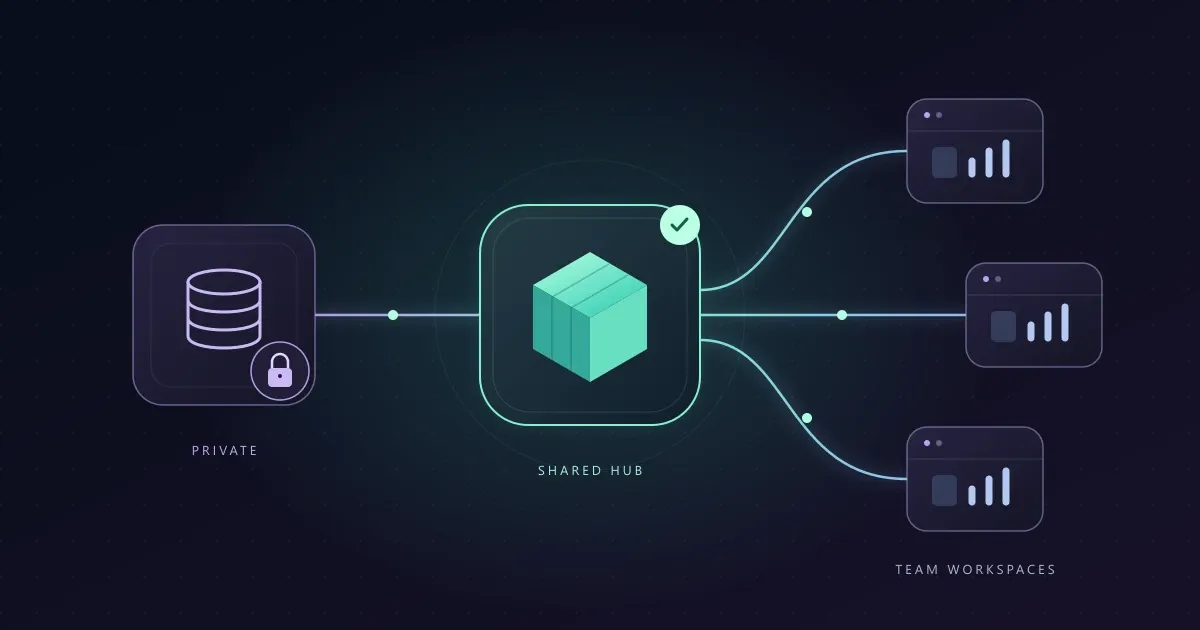
Maya proposes three clearly defined places:
- Private preparation: trusted engineers work with the original readings and restricted notes.
- Shared publication: the team makes an approved station-availability table available.
- Team workspaces: Jules and other teams build their own analyses using that approved table.
The shared publication area is the hub. The independent team workspaces are the spokes. That is the useful idea behind hub-and-spoke: share a trusted result while letting teams do their own work.
Private inputs stay protected. Publish the approved result once, then let teams read it without creating a stored copy for each workspace.
Restricted readings and technician notes stay with trusted engineers. Team workspaces do not receive access to those inputs.
Idea 1 of 4
The arrows from the shared table mean approved reads, not a new stored copy in every workspace.
Make one decision for this example
“Let’s publish station availability once,” says Maya. “Not once for every team.”
For this fictional design, the teams need the same approved information. They do not need independent snapshots, and the engineers can run a trusted process that reads private inputs and writes the approved output.
Here is the proposed arrangement:
First, keep the inputs private. Jules cannot browse the preparation area or read the technician notes.
Next, publish only the finished result. A producer-controlled process calculates availability and writes a shared table containing station name, available bikes, and service status. It leaves the restricted notes out.
Then, give teams access to that result. Jules builds reports or notebooks in her team’s workspace. Another team can use the same published product without receiving access to the private preparation area.
The publishing process needs permission to read the inputs and write the result. Jules does not inherit those permissions. The team must verify that separation before using the design.
Notice what Maya has chosen: she still stores an approved output, but she does not propose another identical output just because another team needs to read it. Nor does this design require keeping an identical finished table in the private area unless another genuine requirement needs it.
Why not just move everything into the shared area?
“Wouldn’t it be easier to put the calculation and its inputs beside Jules’s table?” asks Maya.
“Easier for whom?” asks Leo.
Moving private inputs into a place with broader access would defeat the purpose. The publishing process may need those inputs; the readers do not. The important boundary is not where a box sits on the diagram. It is what each person and process can actually access.
Likewise, Jules may need permission to create notebooks in her own workspace. That does not mean she needs permission to change the shared source or the process that publishes it. The hub is a front door to approved products, not a key to the whole building.
So, should you never copy data?
No. That would be the wrong lesson. A separate copy can have a real purpose. A team might need a frozen month-end snapshot, a different calculation, or a separately controlled dataset.
But “another team asked for access” does not, by itself, establish a need for another stored result.
Fabric also offers ways to reference existing data. A OneLake shortcut, for example, points to data elsewhere rather than creating a separate snapshot. It still needs the right permissions; it does not make restricted data safe automatically.
You do not need to choose that mechanism yet to understand the design. First decide what readers need and what must remain private. Then select and test a supported way to connect them.
Ask this before making the next copy
Take one table that several teams need. Ask:
- Do they need the same result, or genuinely different results?
- Can they read the approved result without reaching private inputs?
- What specific requirement would another stored copy satisfy?
If the answer to the third question is only “it needs to appear in another workspace,” reconsider the copy.
Maya puts down her pen. “We don’t need a new kitchen for every person ordering lunch.”
Exactly. Protect the inputs. Publish an approved result. Give teams room to build without making a fresh copy at every boundary.
That is what hub-and-spoke should help you do.
Next: Let them build without giving them the keys to everything.